A program that implements a state machine for changing the flashing pattern of an LED.
More...
|
|
int | lab2.state = 0 |
| | The current state of the elevator finite state machine.
|
| |
|
| lab2.lastTransition = utime.ticks_ms() |
| |
|
bool | lab2.buttonPress = False |
| | Wether or not the button is pressed (True = pressed).
|
| |
|
| lab2.pinC13 = pyb.Pin(pyb.Pin.cpu.C13) |
| |
|
| lab2.ButtonInt = pyb.ExtInt(pinC13, mode=pyb.ExtInt.IRQ_FALLING, pull=pyb.Pin.PULL_NONE, callback=onButtonPressFCN) |
| |
|
| lab2.pinA5 = pyb.Pin (pyb.Pin.cpu.A5) |
| |
|
| lab2.tim2 = pyb.Timer(2, freq = 20000) |
| |
|
| lab2.t2ch1 = tim2.channel(1, pyb.Timer.PWM, pin=pinA5) |
| |
| dictionary | lab2.stateMessages |
| |
|
int | lab2.dutyCycle = 0 |
| |
A program that implements a state machine for changing the flashing pattern of an LED.
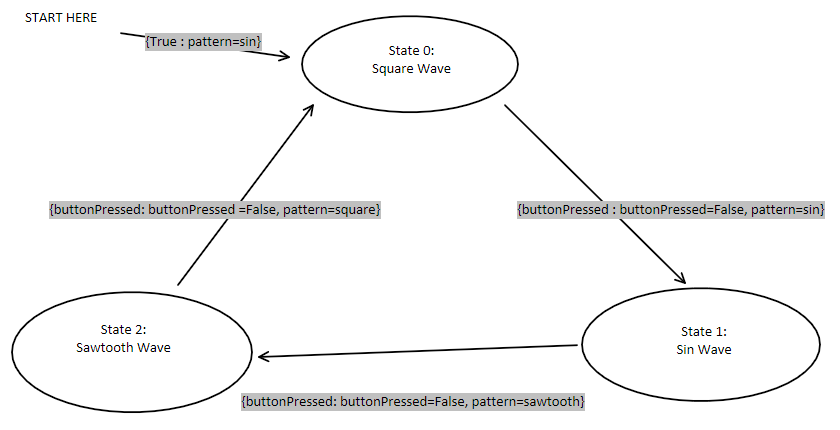
Link to Source Code: https://bitbucket.org/ebriefer/me305_lab/src/master/Lab%202/lab2.py Demonstration https://youtu.be/98HGiMh8p0U This program cycles through three different flashing patterns for and LED on the nucleo board. Specifically, the three patterns are a square wave, a sine wave, and sawtooth wave. The LED pattern changes every time the user presses the blue button on the nucleo. State machine diagram:
- Author
- Eliot Briefer
- Date
- 2/4/2020
◆ sawtoothWave()
| def lab2.sawtoothWave |
( |
|
tick | ) |
|
A function that generates a sawtooth wave that oscillates between 0 and 100.
- Parameters
-
| tick | The current clock tick in milliseconds. |
- Returns
- The value of the sawtooth wave at the given tick.
◆ sineWave()
| def lab2.sineWave |
( |
|
tick | ) |
|
A function that generates a sine wave that oscillates between 0 and 100.
- Parameters
-
| tick | The current clock tick in milliseconds. |
- Returns
- The value of the sine wave at the given tick.
◆ squareWave()
| def lab2.squareWave |
( |
|
tick | ) |
|
A function that generates a square wave that oscillates between 0 and 100.
- Parameters
-
| tick | The current clock tick in milliseconds. |
- Returns
- The value of the square wave at the given tick.
◆ transitionStates()
| def lab2.transitionStates |
( |
|
trans, |
|
|
|
st |
|
) |
| |
A function that preforms all repetative tasks durring a state change.
- Parameters
-
| trans | A boolean representing wether to transition or not (True = transition now). |
| st | The state to transition to. |
◆ stateMessages
| dictionary lab2.stateMessages |
Initial value:
2 0 :
"Square wave pattern selected",
3 1 :
"Sine wave pattern selected",
4 2 :
"Sawtooth wave pattern selected"


 1.9.0
1.9.0